



Automate real-time delivery notifications and reduce customer service calls by integrating SMS alerts directly into your RouteWise field service operations.
Why SMS Notifications Transform Field Service Communication
Field service operations face a persistent challenge: keeping customers informed while minimising operational disruptions. Traditional communication methods—phone calls, emails, or manual status updates—consume valuable time, create bottlenecks, and often fail to reach customers when they need information most. SMS notifications address this fundamental inefficiency by delivering instant, direct updates that customers can access immediately on their mobile devices.
The impact on operational efficiency is substantial. When field service teams integrate SMS notifications into their workflow, they reduce inbound customer enquiries by up to 60%, freeing customer service resources to focus on complex issues rather than routine status requests. Drivers and technicians spend less time making courtesy calls and more time completing jobs. For businesses managing multiple delivery routes or service appointments daily, this time savings translates directly to improved productivity and reduced operational costs.
Customer satisfaction improves measurably when businesses provide proactive communication. Real-time SMS updates about estimated arrival times, job completion, or schedule changes demonstrate respect for the customer's time and eliminate the frustration of waiting without information. This transparency builds trust and positions your business as professional and customer-focused. For organisations using RouteWise to manage field operations, SMS integration represents a strategic advantage that enhances both service delivery and competitive positioning.
Prerequisites for RouteWise and Twilio Integration
Before configuring SMS notifications in RouteWise, you need to establish accounts and gather specific credentials from both platforms. First, ensure you have administrative access to your RouteWise account with permissions to modify integration settings. You will be working with sensitive configuration parameters, so appropriate security protocols should be in place before proceeding.
From the Twilio side, you need an active Twilio account with a verified phone number capable of sending SMS messages. This requires completing Twilio's registration process and funding your account appropriately based on your expected message volume. Australian businesses should verify that their Twilio number supports SMS delivery to Australian mobile networks and complies with local telecommunications regulations.
Critical credentials you will need include your Twilio Account SID and Auth Token, both of which are available from your Twilio console dashboard. These authentication parameters establish the secure connection between RouteWise and Twilio's messaging infrastructure. Additionally, identify the Twilio phone number you intend to use as the sender for all SMS notifications—this number will appear as the message source for your customers. Document these credentials securely before beginning the integration process, as you will need to enter them precisely during configuration.
Step-by-Step Guide to Configuring Twilio in RouteWise
To setup the connection you will require some details from Twilio. to get these details login to your twilio admin dashboard and navigate to the "develop" page:
 On this page you can find your Account SID, Auth Token and My Twilio phone number. Save these for the next step.
Continue the integration process by logging into your RouteWise account with administrative credentials. Navigate to the Settings section, typically found in the main navigation menu or under your account profile options. Within Settings, locate the Notifications page:
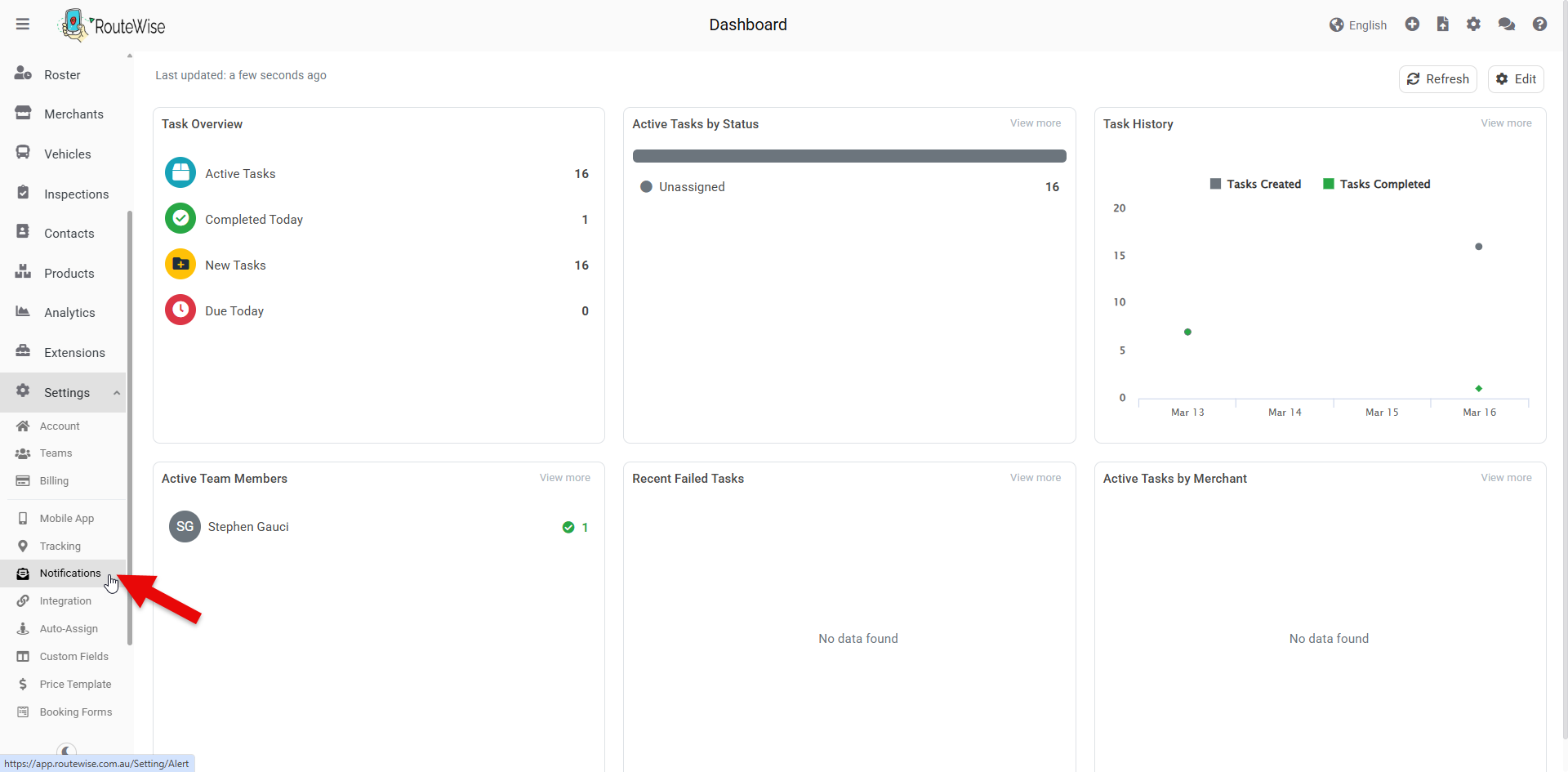
On this page click SMS Gateway:

You will be presented with a configuration form requiring your Twilio credentials. Enter your Twilio Account SID in the designated field, ensuring no additional spaces or characters are included. Next, enter your Twilio Auth Token, taking care to copy this sensitive credential accurately. Finally, specify the Twilio phone number that will send SMS notifications to your customers, formatted according to international standards (typically with country code prefix).
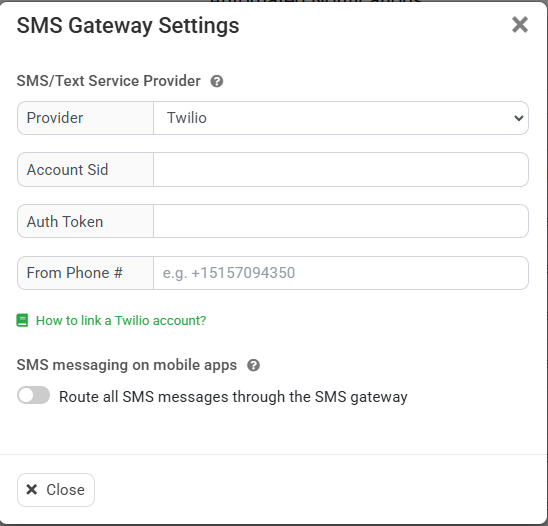
Once verification succeeds, save the integration configuration. The connection between RouteWise and Twilio is now active, establishing the technical foundation for automated SMS notifications.
Customising SMS Templates for Delivery and Service Updates
RouteWise provides template-based SMS messaging that allows you to define message content for various job stages and customer touchpoints. Access the SMS Templates section within your RouteWise settings under Notifications, where you will find pre-configured templates for common scenarios such as job confirmation, driver en route notifications, estimated time of arrival updates, job completion, etc.
Each template supports dynamic variables that automatically populate with job-specific information when messages are sent. Common variables include customer name, job reference number, driver name, estimated arrival time, and job address. Structure your templates to provide actionable information concisely—SMS messages should be brief while containing all essential details. For example, an en route notification might read: 'Hi [Customer Name], your driver [Driver Name] is on the way to [Address]. Expected arrival: [ETA]. Job ref: [Job Number]. Questions? Call [Business Phone].'
Professional SMS communication requires attention to tone and clarity. Write messages using plain language that customers can understand immediately. Include your business name in the initial message if the customer may not recognise your Twilio phone number. Provide contact options for customers who need to make changes or ask questions. Respect customer preferences regarding communication frequency—avoid sending excessive updates that could be perceived as intrusive.
Australian businesses should ensure all SMS templates comply with the Spam Act 2003, including clear identification of the sending business and relevant contact information. Consider time zones and operating hours when configuring automated messages to avoid sending notifications at inappropriate times. Test each template by sending samples to yourself and colleagues, reviewing them from a customer perspective to ensure clarity, professionalism, and accuracy of dynamic fields.
Optimising SMS Workflows to Improve Customer Experience and Operational Efficiency
The technical integration of Twilio with RouteWise creates the foundation, but operational excellence requires thoughtful configuration of when and how SMS notifications are triggered. Review your field service workflow to identify the customer touchpoints where proactive communication delivers the most value. Typical high-impact moments include job confirmation (sent immediately after booking), dispatch notification (when a driver is assigned), en route update (when the driver begins travelling to the job site), and completion confirmation (after job closure).
Configure triggers within RouteWise to automate SMS sending based on job status changes. This automation ensures consistent communication without requiring manual intervention from dispatchers or customer service staff. For example, when a job status changes to 'In Transit' in RouteWise, the system should automatically generate and send the corresponding SMS template to the customer's registered mobile number. This real-time synchronisation between field operations and customer communication eliminates delays and reduces the risk of missed notifications.
Monitor SMS delivery performance and customer engagement metrics to refine your approach. Twilio provides delivery reports that indicate whether messages were successfully received. Use this data to identify patterns—do customers call less frequently after implementing specific notification types? Are there job stages where customers still require additional information? Continuous optimisation based on actual usage patterns ensures your SMS strategy evolves with operational needs.
Cost management remains an important consideration for businesses sending high volumes of SMS notifications. Review your Twilio usage regularly and forecast monthly expenses based on job volume. Consider implementing selective notifications where only specific job types or customer segments receive SMS updates, balancing communication value against per-message costs. For businesses managing complex supply chains or distribution networks, the reduction in customer service calls and improved delivery success rates typically justify SMS expenses many times over, representing a sound investment in operational efficiency and customer satisfaction.

An exciting new chapter: Stratus joins Pine Services Group

Civil Construction Meets The Cloud Acumatica Integration For Seamless Project Accounting









No Comments Yet
Let us know what you think